Building the Docs Assistant v2
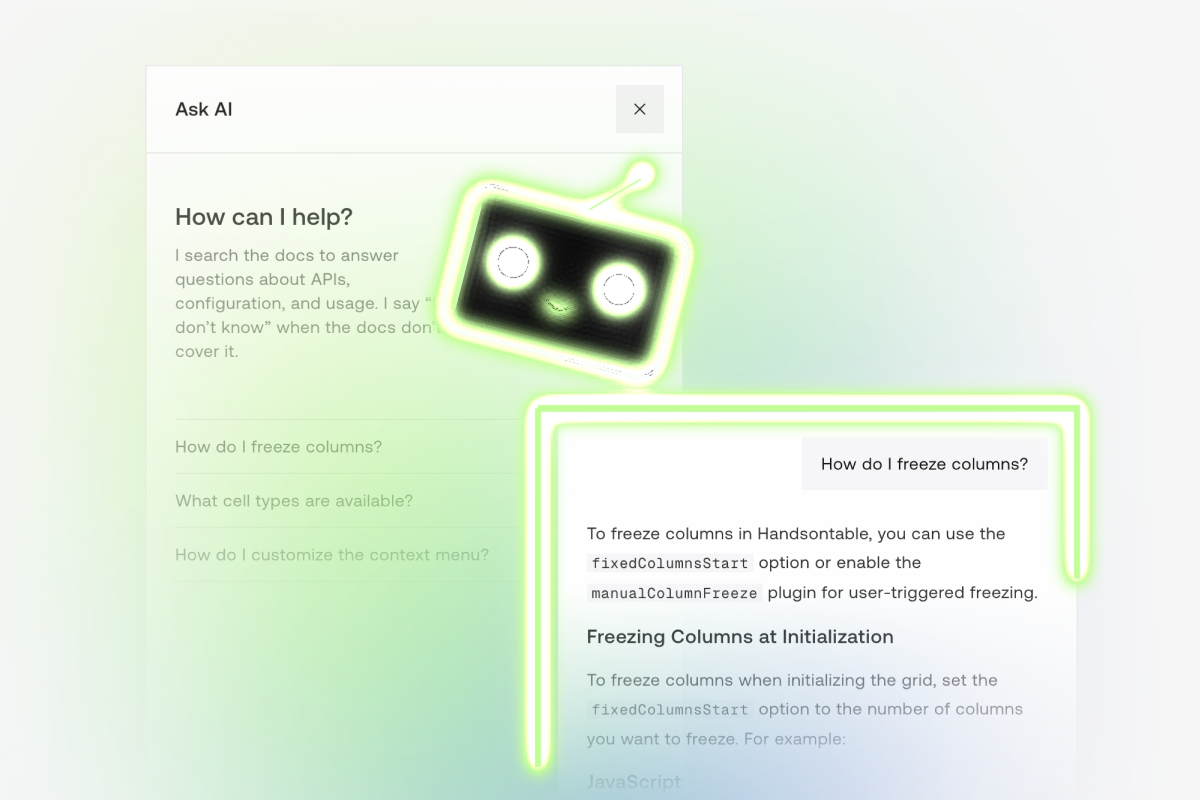
Build vs. buy
Handsontable has a lot of docs. When you count guides, API references, framework wrappers for React, Angular and Vue, and different docs for each of 18 major versions and all the minor releases in between… it’s roughly 20,000 pages. Keyword search will only help so much when there are many results. We needed an AI assistant for our docs.
I looked at the off-the-shelf options first, starting with Kapa.ai. It’s a solid product and probably would have worked for our use case, but we decided against it due to cost. I also looked at Mintlify, since it has a built-in AI chat that knows your docs. But there were several requirements that their platform couldn’t meet. It’s more for HTTP APIs, not JavaScript libraries with embedded demos in different frameworks.
So I decided to try building it myself. I started with a basic MVP, using a Pinecone Assistant and the Skill Seekers repo to build the RAG pipeline. Between those two tools, there wasn’t much extra code to write other than tying it into the docs website frontend. I had it live on prod in just three days, and users started asking questions on it almost immediately.
Full disclosure: I’m a big fan of Pinecone, and I’m a founding member of their Pioneers ambassador program.
It works. Now how do we maintain it?
Initial results were excellent. The answer quality from Pinecone (using GPT-4o) was accurate and extremely helpful, and it wrote valid, runnable code. The team was very pleased with it, and the customers were making good use of it.
Then we shipped a new release of our library and the knowledge base needed updating.
I wrote several maintenance scripts to manage updates, set up a dev environment, automated some of the CI/CD, and tried to make it as easy to maintain as possible. But I quickly realized that I was writing an excessive amount of code just to work around certain limitations in the tech stack.
Pinecone worked great to get the MVP shipped quickly, but the process around updating it each time we released a new version of Handsontable or HyperFormula was becoming a pain point. Their API only supports uploading one file at a time, and you can’t rename an assistant or clone it. This made deploying a new assistant slow and brittle, with lots of 429 rate limit errors, and more workaround code to throttle requests.
It was time to rebuild the docs assistant in a more maintainable stack. But I don’t regret choosing Pinecone. Building v2 took way more effort, and that would not have been justified without the success we saw from the MVP.
Building v2 on Cloudflare
I looked at OpenAI first, but their file upload API didn’t support bulk file uploads either, and that was one of the biggest pain points with Pinecone’s Assistants. I could have used their vector database directly, but then the text generation model is no longer bundled, and I would have had to add two new tools to replace one. So I looked at Cloudflare next.
Honestly, it was the path of least resistance. We were already hosting our docs on Cloudflare, so adding Vectorize and Workers AI meant no new vendor, no new account, and no new keys to manage. It also made it easier to integrate rate limiting, bot detection, and all the other tools that come with Cloudflare.
The architecture
A GitHub Actions workflow rebuilds the knowledge base daily from about 2,000 Markdown files from the current version of the docs, our blog, our agent skills repo, and GitHub issues, changelogs and release notes.
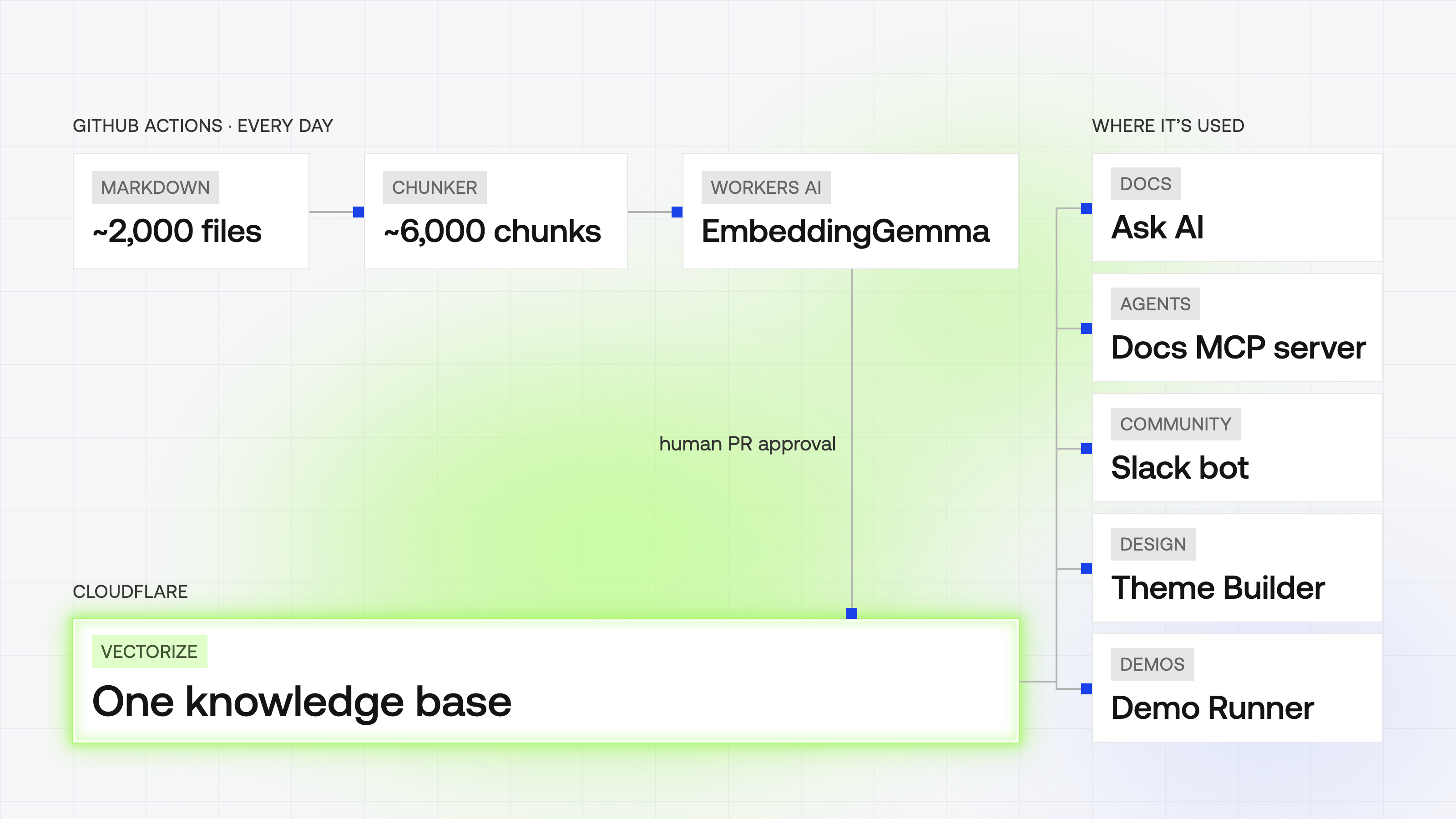
Those files get split into about 6,000 chunks. The chunker tries headings first, then paragraphs, and only splits on raw lines as a last resort. Each chunk targets about 3,600 characters, with some overlap so context doesn’t get lost at the edges. About half the files fit in a single chunk anyway.
Each chunk contains metadata about what source it came from, the URL if applicable, the library version number, and a content hash so the sync can skip re-embedding files that haven’t changed.
For embeddings, I A/B tested a couple of models on Workers AI and went with EmbeddingGemma. I also tried adding a reranker but it made results worse, so production is just plain cosine similarity.
I built an eval set of 84 real questions before switching from Pinecone to Cloudflare, to make sure retrieval quality didn’t drop. v1 scored 88.5% and v2 scored about 87% once a few judging quirks were adjusted. So basically equivalent on retrieval quality. But v2 answers were four to five times more concise, prompts dropped from about 30,000 tokens a turn to about 10,000, and median latency went from 2.6 seconds to 1.1. So still a big win even though the accuracy didn’t change much.
A full re-embed now takes about four and a half minutes, down from almost 13. And the daily refresh runs in under four minutes. Everything is automated except a human PR approval as the last step. The new assistant is checked with the eval set and the old knowledge base stays live for a week in case I need to roll back.
Rate limiting uses Cloudflare’s built-in limiter bindings, with a proxy passing through the real client IP so everyone doesn’t share one bucket. And there’s a spend cap on the LLM usage set in our LLM gateway, LiteLLM. So there’s no concern about excessive spend from a spike in traffic.
So far, the total spend on tokens since migrating has been just $34.19. That’s about $0.03 per chat turn, or ~$150/year, and about $18,000 cheaper to build vs. buy.
The little things it does
A few features that go beyond just answering questions:
- Your conversation follows you. The chat persists across pages. You can ask something on one page, go to the next page, and ask another question, and it still has the whole chat history from that session. It always knows the current page you’re on, but it also knows your last questions, so the conversation can continue across multiple pages of the docs.
- One-click questions on API pages. The API reference has canned prompts like “Tell me what afterChange in Hooks is responsible for and give me an example use case.” Those turned out to be a big share of the traffic.
- It answers in Slack. The same assistant now answers questions in our Slack community, not just on the website.
- It’s hardened against prompt injection. People try. We’ve seen fake admin overrides and plenty of “ignore your system instructions.”
- It gives bots directions instead of a 403. In September, what was probably an xAI crawler fleet started hammering the docs assistant. Instead of blocking it, I sent automated traffic a static reply pointing to the MCP server and search API, the surfaces built for agents. I wrote about the incident in Grok is obsessed with our docs.
More than a docs assistant
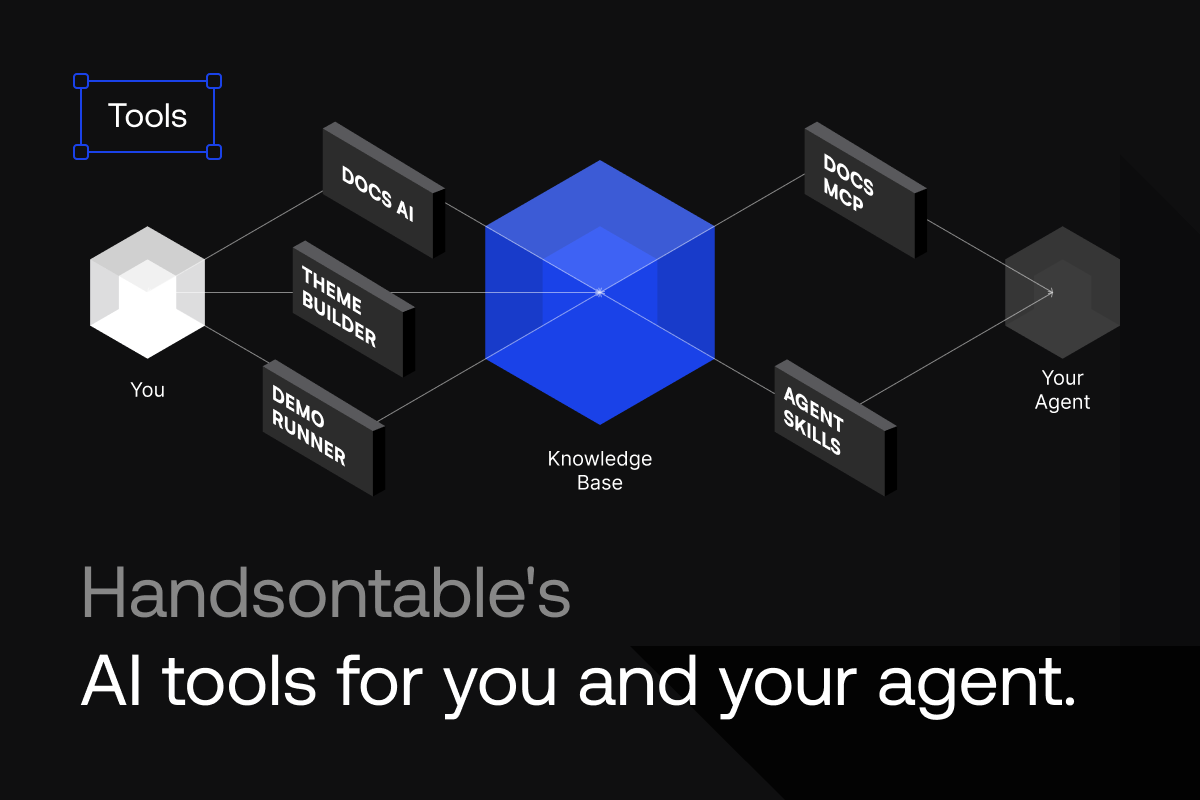
Originally the goal was to build an AI assistant for our docs. That required building the RAG pipeline and knowledge base, which has led to several other new tools and integrations. The same knowledge base now feeds our MCP server.
So a human can use Ask AI in the docs, and an agent can use the MCP to search the same knowledge base. The MCP doesn’t generate the answer. It only returns chunks, with the metadata and citation URLs.
That makes it cheaper. People using their own coding agent already have an agent answering questions for them. So we just give them the raw chunks and let them generate their own answer. The only place we’re burning tokens is the Docs Assistant on the actual website.
We also added it to our AI Theme Builder and Demo Runner. It’s become a core part of multiple products in just a few months.
Building it twice
Yes, I built it twice. But the time to research and build the second version would not have been justifiable without the proven results from the MVP. The architecture didn’t matter as much as the end product, and validating the usefulness of it. Pinecone made it possible to do that almost instantly.
And the results are real. Since launch, people have asked the assistant around 2,400 questions, from the US, China, Japan, India, Vietnam, Brazil, Germany, and dozens of other countries. A lot of them don’t ask in English. So it answers in whatever language you ask in, but it never translates the code. If it changed a method name, the code would break.
AI tools for you and your agent
Give it a try yourself. You can use the Ask AI button in the docs, or connect your agent to the same knowledge base using our MCP server. Try asking it to build a demo of a certain feature, check your code, or theme your table. And if you’re building web apps with advanced data grid features, give our agent skills a try.