



Add AI-classified columns with Jev
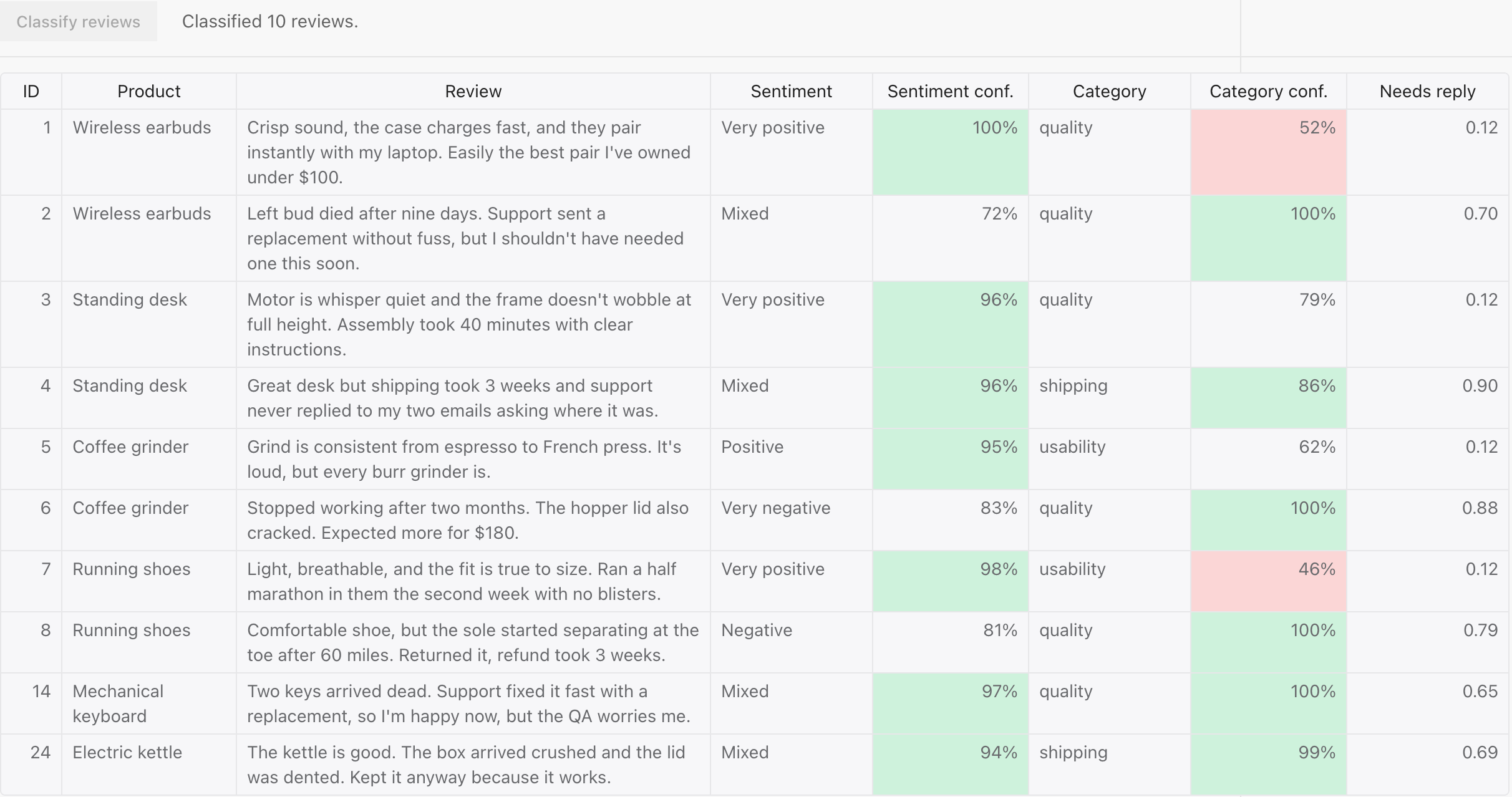
In this tutorial, you will add three AI-generated columns to a grid of product reviews with one click: a sentiment level, an issue category, and the probability that the review needs a reply. You will learn how to define the columns in code, send one request per row to a decision model, write each answer into the grid as it lands, and show the model’s confidence next to every value.
import Handsontable from 'handsontable/base';import { registerAllModules } from 'handsontable/registry';import { textRenderer } from 'handsontable/renderers';
registerAllModules();
// The columns to add. `type` is the Jev question type: noul (yes or no),// score (one of ordered levels), choice (one option from a list).const AI_COLUMNS = [ { key: 'sentiment', name: 'Sentiment', type: 'score', prompt: 'How positive is this review overall?', options: ['Very negative', 'Negative', 'Mixed', 'Positive', 'Very positive'], }, { key: 'category', name: 'Category', type: 'choice', prompt: 'Which category best fits the main issue in this review?', options: ['quality', 'shipping', 'price', 'support', 'usability'], }, { key: 'needsReply', name: 'Needs reply', type: 'noul', prompt: 'Does this review warrant a reply from customer support?', },];
/* start:skip-in-preview */const reviews = [ { id: 1, product: 'Wireless earbuds', review: "Crisp sound, the case charges fast, and they pair instantly with my laptop. Easily the best pair I've owned under $100.", }, { id: 2, product: 'Wireless earbuds', review: "Left bud died after nine days. Support sent a replacement without fuss, but I shouldn't have needed one this soon.", }, { id: 3, product: 'Standing desk', review: "Motor is whisper quiet and the frame doesn't wobble at full height. Assembly took 40 minutes with clear instructions.", }, { id: 4, product: 'Standing desk', review: 'Great desk but shipping took 3 weeks and support never replied to my two emails asking where it was.', }, { id: 5, product: 'Coffee grinder', review: "Grind is consistent from espresso to French press. It's loud, but every burr grinder is.", }, { id: 6, product: 'Coffee grinder', review: 'Stopped working after two months. The hopper lid also cracked. Expected more for $180.', }, { id: 7, product: 'Running shoes', review: 'Light, breathable, and the fit is true to size. Ran a half marathon in them the second week with no blisters.', }, { id: 8, product: 'Running shoes', review: 'Comfortable shoe, but the sole started separating at the toe after 60 miles. Returned it, refund took 3 weeks.', }, { id: 14, product: 'Mechanical keyboard', review: "Two keys arrived dead. Support fixed it fast with a replacement, so I'm happy now, but the QA worries me.", }, { id: 24, product: 'Electric kettle', review: 'The kettle is good. The box arrived crushed and the lid was dented. Kept it anyway because it works.', },];
// Jev's answers for the rows above, recorded from the API on 2026-10-08.// Keyed "<column key>:<review id>". Score probabilities are per level index.const RECORDED = { 'sentiment:1': { type: 'score', score: 4.0, confidence: 1.0, probabilities: { 0: 0, 1: 0, 2: 0, 3: 0, 4: 1 } }, 'sentiment:2': { type: 'score', score: 1.66, confidence: 0.72, probabilities: { 0: 0, 1: 0.33, 2: 0.67, 3: 0, 4: 0 }, }, 'sentiment:3': { type: 'score', score: 3.95, confidence: 0.96, probabilities: { 0: 0, 1: 0, 2: 0, 3: 0.04, 4: 0.96 }, }, 'sentiment:4': { type: 'score', score: 1.95, confidence: 0.96, probabilities: { 0: 0, 1: 0.05, 2: 0.95, 3: 0, 4: 0 }, }, 'sentiment:5': { type: 'score', score: 3.05, confidence: 0.95, probabilities: { 0: 0, 1: 0, 2: 0.01, 3: 0.93, 4: 0.06 }, }, 'sentiment:6': { type: 'score', score: 0.2, confidence: 0.83, probabilities: { 0: 0.8, 1: 0.2, 2: 0, 3: 0, 4: 0 } }, 'sentiment:7': { type: 'score', score: 3.98, confidence: 0.98, probabilities: { 0: 0, 1: 0, 2: 0, 3: 0.02, 4: 0.98 }, }, 'sentiment:8': { type: 'score', score: 1.21, confidence: 0.81, probabilities: { 0: 0.01, 1: 0.77, 2: 0.22, 3: 0, 4: 0 }, }, 'sentiment:14': { type: 'score', score: 2.04, confidence: 0.97, probabilities: { 0: 0, 1: 0, 2: 0.96, 3: 0.04, 4: 0 }, }, 'sentiment:24': { type: 'score', score: 2.06, confidence: 0.94, probabilities: { 0: 0, 1: 0.01, 2: 0.92, 3: 0.07, 4: 0 }, }, 'category:1': { type: 'choice', choice: 'quality', confidence: 0.52 }, 'category:2': { type: 'choice', choice: 'quality', confidence: 1.0 }, 'category:3': { type: 'choice', choice: 'quality', confidence: 0.79 }, 'category:4': { type: 'choice', choice: 'shipping', confidence: 0.86 }, 'category:5': { type: 'choice', choice: 'usability', confidence: 0.62 }, 'category:6': { type: 'choice', choice: 'quality', confidence: 1.0 }, 'category:7': { type: 'choice', choice: 'usability', confidence: 0.46 }, 'category:8': { type: 'choice', choice: 'quality', confidence: 1.0 }, 'category:14': { type: 'choice', choice: 'quality', confidence: 1.0 }, 'category:24': { type: 'choice', choice: 'shipping', confidence: 0.99 }, 'needsReply:1': { type: 'noul', noul: 0.12 }, 'needsReply:2': { type: 'noul', noul: 0.7 }, 'needsReply:3': { type: 'noul', noul: 0.12 }, 'needsReply:4': { type: 'noul', noul: 0.9 }, 'needsReply:5': { type: 'noul', noul: 0.12 }, 'needsReply:6': { type: 'noul', noul: 0.88 }, 'needsReply:7': { type: 'noul', noul: 0.12 }, 'needsReply:8': { type: 'noul', noul: 0.79 }, 'needsReply:14': { type: 'noul', noul: 0.65 }, 'needsReply:24': { type: 'noul', noul: 0.69 },};/* end:skip-in-preview */
// Stand-in for the model: a recorded answer after a short delay, so the page// needs no backend. For the real model, send `{ type, prompt, options, row }`// to a proxy that holds your key (see Step 5 on the page).function classify(row, column) { const answer = RECORDED[`${column.key}:${row.id}`];
return new Promise((resolve, reject) => { setTimeout( () => { if (answer) { resolve(answer); } else { reject(new Error('No answer')); } }, 150 + Math.random() * 250, ); });}
// Which of Jev's fields go into the cells. A Noul is a single probability and// has no confidence field, so a Noul column gets no confidence column.function toCells(column, answer) { switch (answer.type) { case 'noul': return { value: answer.noul }; case 'score': { // The level with the highest probability; `probabilities` is keyed by level index. const [best] = Object.entries(answer.probabilities).sort(([, a], [, b]) => b - a)[0];
return { value: column.options?.[Number(best)] ?? String(answer.score), confidence: answer.confidence }; } case 'choice': return { value: answer.choice, confidence: answer.confidence }; default: return { value: '' }; }}
// Per-cell state, keyed "<column key>:<review id>" so it survives sorting.const pending = new Set();const failed = new Map();
function cellKey(instance, visualRow, column) { const row = instance.getSourceDataAtRow(instance.toPhysicalRow(visualRow));
return `${column.key}:${row.id}`;}
const valueRenderer = (column) => (instance, td, row, col, prop, value, cellProperties) => { const text = typeof value === 'number' ? value.toFixed(2) : (value ?? '');
textRenderer(instance, td, row, col, prop, text, cellProperties);
const key = cellKey(instance, row, column);
td.classList.toggle('ai-pending', pending.has(key)); td.classList.toggle('ai-error', failed.has(key));
if (failed.has(key)) { td.textContent = 'err'; td.title = failed.get(key) ?? ''; } else { td.removeAttribute('title'); }};
const confidenceRenderer = (column) => (instance, td, row, col, prop, value, cellProperties) => { const text = typeof value === 'number' ? `${Math.round(value * 100)}%` : '';
textRenderer(instance, td, row, col, prop, text, cellProperties);
const key = cellKey(instance, row, column);
td.classList.toggle('ai-pending', pending.has(key)); td.classList.toggle('ai-low', typeof value === 'number' && value < 0.6); td.classList.toggle('ai-high', typeof value === 'number' && value > 0.85);};
const rootContainer = document.querySelector('#example1');
// Inject the controls row and the grid mount point inside #example1.rootContainer.innerHTML = ` <div class="example-controls-container"> <div class="controls"> <button class="ai-classify" type="button">Classify reviews</button> <span class="ai-status"></span> </div> </div> <div class="ai-columns-grid"></div>`;
const button = rootContainer.querySelector('.ai-classify');const status = rootContainer.querySelector('.ai-status');
const columns = [ { data: 'id', readOnly: true, width: 50, className: 'htRight' }, { data: 'product', readOnly: true, width: 140 }, { data: 'review', readOnly: true, width: 380 },];const headers = ['ID', 'Product', 'Review'];
const hot = new Handsontable(rootContainer.querySelector('.ai-columns-grid'), { data: reviews, columns, colHeaders: headers, columnSorting: true, height: 'auto', width: '100%', autoWrapRow: true, licenseKey: 'non-commercial-and-evaluation',});
// Runs `worker` over `items` with at most `limit` in flight.async function runPool(items, limit, worker) { let next = 0;
const lanes = Array.from({ length: Math.min(limit, items.length) }, async () => { while (next < items.length) { const item = items[next];
next += 1; await worker(item); } });
await Promise.all(lanes);}
button.addEventListener('click', async () => { button.disabled = true;
// 1. Add a value column per definition, a confidence column where Jev // returns one, and mark every new cell as pending. AI_COLUMNS.forEach((column) => { columns.push({ data: column.key, readOnly: true, renderer: valueRenderer(column), width: 130, className: column.type === 'noul' ? 'htRight' : '', }); headers.push(column.name);
if (column.type !== 'noul') { columns.push({ data: `${column.key}Confidence`, readOnly: true, renderer: confidenceRenderer(column), width: 125, className: 'htRight', }); headers.push(`${column.name} conf.`); }
reviews.forEach((row) => pending.add(`${column.key}:${row.id}`)); }); hot.updateSettings({ columns: [...columns], colHeaders: [...headers] });
// 2. One request per cell, a few at a time. Results are written by physical // row, so a sort applied mid-fill cannot misplace them. const jobs = AI_COLUMNS.flatMap((column) => reviews.map((row) => ({ column, row }))); let done = 0;
await runPool(jobs, 4, async ({ column, row }) => { const key = `${column.key}:${row.id}`; const physicalRow = reviews.indexOf(row);
try { const cells = toCells(column, await classify(row, column));
hot.setSourceDataAtCell(physicalRow, column.key, cells.value);
if (cells.confidence !== undefined) { hot.setSourceDataAtCell(physicalRow, `${column.key}Confidence`, cells.confidence); } } catch (error) { failed.set(key, error instanceof Error ? error.message : 'Request failed'); } finally { pending.delete(key); done += 1; status.textContent = `${done} of ${jobs.length} answers`; hot.render(); } });
status.textContent = `Classified ${reviews.length} reviews.`;});import Handsontable from 'handsontable/base';import { registerAllModules } from 'handsontable/registry';import { textRenderer } from 'handsontable/renderers';import type { BaseRenderer } from 'handsontable/renderers';import type { ColumnSettings } from 'handsontable/settings';
registerAllModules();
type Row = { id: number; product: string; review: string; [aiColumn: string]: string | number | null;};
type AiColumn = { key: string; name: string; type: 'noul' | 'score' | 'choice'; prompt: string; options?: string[];};
// Jev's answer shapes, as returned by the API (only the fields this example reads).type JevAnswer = | { type: 'noul'; noul: number } | { type: 'score'; score: number; confidence: number; probabilities: Record<string, number> } | { type: 'choice'; choice: string; confidence: number };
// The columns to add. `type` is the Jev question type: noul (yes or no),// score (one of ordered levels), choice (one option from a list).const AI_COLUMNS: AiColumn[] = [ { key: 'sentiment', name: 'Sentiment', type: 'score', prompt: 'How positive is this review overall?', options: ['Very negative', 'Negative', 'Mixed', 'Positive', 'Very positive'], }, { key: 'category', name: 'Category', type: 'choice', prompt: 'Which category best fits the main issue in this review?', options: ['quality', 'shipping', 'price', 'support', 'usability'], }, { key: 'needsReply', name: 'Needs reply', type: 'noul', prompt: 'Does this review warrant a reply from customer support?', },];
/* start:skip-in-preview */const reviews: Row[] = [ { id: 1, product: 'Wireless earbuds', review: "Crisp sound, the case charges fast, and they pair instantly with my laptop. Easily the best pair I've owned under $100." }, { id: 2, product: 'Wireless earbuds', review: "Left bud died after nine days. Support sent a replacement without fuss, but I shouldn't have needed one this soon." }, { id: 3, product: 'Standing desk', review: "Motor is whisper quiet and the frame doesn't wobble at full height. Assembly took 40 minutes with clear instructions." }, { id: 4, product: 'Standing desk', review: 'Great desk but shipping took 3 weeks and support never replied to my two emails asking where it was.' }, { id: 5, product: 'Coffee grinder', review: "Grind is consistent from espresso to French press. It's loud, but every burr grinder is." }, { id: 6, product: 'Coffee grinder', review: 'Stopped working after two months. The hopper lid also cracked. Expected more for $180.' }, { id: 7, product: 'Running shoes', review: 'Light, breathable, and the fit is true to size. Ran a half marathon in them the second week with no blisters.' }, { id: 8, product: 'Running shoes', review: 'Comfortable shoe, but the sole started separating at the toe after 60 miles. Returned it, refund took 3 weeks.' }, { id: 14, product: 'Mechanical keyboard', review: "Two keys arrived dead. Support fixed it fast with a replacement, so I'm happy now, but the QA worries me." }, { id: 24, product: 'Electric kettle', review: 'The kettle is good. The box arrived crushed and the lid was dented. Kept it anyway because it works.' },];
// Jev's answers for the rows above, recorded from the API on 2026-10-08.// Keyed "<column key>:<review id>". Score probabilities are per level index.const RECORDED: Record<string, JevAnswer> = { 'sentiment:1': { type: 'score', score: 4.0, confidence: 1.0, probabilities: { 0: 0, 1: 0, 2: 0, 3: 0, 4: 1 } }, 'sentiment:2': { type: 'score', score: 1.66, confidence: 0.72, probabilities: { 0: 0, 1: 0.33, 2: 0.67, 3: 0, 4: 0 } }, 'sentiment:3': { type: 'score', score: 3.95, confidence: 0.96, probabilities: { 0: 0, 1: 0, 2: 0, 3: 0.04, 4: 0.96 } }, 'sentiment:4': { type: 'score', score: 1.95, confidence: 0.96, probabilities: { 0: 0, 1: 0.05, 2: 0.95, 3: 0, 4: 0 } }, 'sentiment:5': { type: 'score', score: 3.05, confidence: 0.95, probabilities: { 0: 0, 1: 0, 2: 0.01, 3: 0.93, 4: 0.06 } }, 'sentiment:6': { type: 'score', score: 0.2, confidence: 0.83, probabilities: { 0: 0.8, 1: 0.2, 2: 0, 3: 0, 4: 0 } }, 'sentiment:7': { type: 'score', score: 3.98, confidence: 0.98, probabilities: { 0: 0, 1: 0, 2: 0, 3: 0.02, 4: 0.98 } }, 'sentiment:8': { type: 'score', score: 1.21, confidence: 0.81, probabilities: { 0: 0.01, 1: 0.77, 2: 0.22, 3: 0, 4: 0 } }, 'sentiment:14': { type: 'score', score: 2.04, confidence: 0.97, probabilities: { 0: 0, 1: 0, 2: 0.96, 3: 0.04, 4: 0 } }, 'sentiment:24': { type: 'score', score: 2.06, confidence: 0.94, probabilities: { 0: 0, 1: 0.01, 2: 0.92, 3: 0.07, 4: 0 } }, 'category:1': { type: 'choice', choice: 'quality', confidence: 0.52 }, 'category:2': { type: 'choice', choice: 'quality', confidence: 1.0 }, 'category:3': { type: 'choice', choice: 'quality', confidence: 0.79 }, 'category:4': { type: 'choice', choice: 'shipping', confidence: 0.86 }, 'category:5': { type: 'choice', choice: 'usability', confidence: 0.62 }, 'category:6': { type: 'choice', choice: 'quality', confidence: 1.0 }, 'category:7': { type: 'choice', choice: 'usability', confidence: 0.46 }, 'category:8': { type: 'choice', choice: 'quality', confidence: 1.0 }, 'category:14': { type: 'choice', choice: 'quality', confidence: 1.0 }, 'category:24': { type: 'choice', choice: 'shipping', confidence: 0.99 }, 'needsReply:1': { type: 'noul', noul: 0.12 }, 'needsReply:2': { type: 'noul', noul: 0.7 }, 'needsReply:3': { type: 'noul', noul: 0.12 }, 'needsReply:4': { type: 'noul', noul: 0.9 }, 'needsReply:5': { type: 'noul', noul: 0.12 }, 'needsReply:6': { type: 'noul', noul: 0.88 }, 'needsReply:7': { type: 'noul', noul: 0.12 }, 'needsReply:8': { type: 'noul', noul: 0.79 }, 'needsReply:14': { type: 'noul', noul: 0.65 }, 'needsReply:24': { type: 'noul', noul: 0.69 },};/* end:skip-in-preview */
// Stand-in for the model: a recorded answer after a short delay, so the page// needs no backend. For the real model, send `{ type, prompt, options, row }`// to a proxy that holds your key (see Step 5 on the page).function classify(row: Row, column: AiColumn): Promise<JevAnswer> { const answer = RECORDED[`${column.key}:${row.id}`];
return new Promise((resolve, reject) => { setTimeout(() => { if (answer) { resolve(answer); } else { reject(new Error('No answer')); } }, 150 + Math.random() * 250); });}
// Which of Jev's fields go into the cells. A Noul is a single probability and// has no confidence field, so a Noul column gets no confidence column.function toCells(column: AiColumn, answer: JevAnswer): { value: string | number; confidence?: number } { switch (answer.type) { case 'noul': return { value: answer.noul }; case 'score': { // The level with the highest probability; `probabilities` is keyed by level index. const [best] = Object.entries(answer.probabilities).sort(([, a], [, b]) => b - a)[0];
return { value: column.options?.[Number(best)] ?? String(answer.score), confidence: answer.confidence }; } case 'choice': return { value: answer.choice, confidence: answer.confidence }; default: return { value: '' }; }}
// Per-cell state, keyed "<column key>:<review id>" so it survives sorting.const pending = new Set<string>();const failed = new Map<string, string>();
function cellKey(instance: Handsontable, visualRow: number, column: AiColumn): string { const row = instance.getSourceDataAtRow(instance.toPhysicalRow(visualRow)) as Row;
return `${column.key}:${row.id}`;}
const valueRenderer = (column: AiColumn): BaseRenderer => (instance, td, row, col, prop, value, cellProperties) => { const text = typeof value === 'number' ? value.toFixed(2) : value ?? '';
textRenderer(instance, td, row, col, prop, text, cellProperties);
const key = cellKey(instance, row, column);
td.classList.toggle('ai-pending', pending.has(key)); td.classList.toggle('ai-error', failed.has(key));
if (failed.has(key)) { td.textContent = 'err'; td.title = failed.get(key) ?? ''; } else { td.removeAttribute('title'); }};
const confidenceRenderer = (column: AiColumn): BaseRenderer => (instance, td, row, col, prop, value, cellProperties) => { const text = typeof value === 'number' ? `${Math.round(value * 100)}%` : '';
textRenderer(instance, td, row, col, prop, text, cellProperties);
const key = cellKey(instance, row, column);
td.classList.toggle('ai-pending', pending.has(key)); td.classList.toggle('ai-low', typeof value === 'number' && value < 0.6); td.classList.toggle('ai-high', typeof value === 'number' && value > 0.85);};
const rootContainer = document.querySelector<HTMLElement>('#example1')!;
// Inject the controls row and the grid mount point inside #example1.rootContainer.innerHTML = ` <div class="example-controls-container"> <div class="controls"> <button class="ai-classify" type="button">Classify reviews</button> <span class="ai-status"></span> </div> </div> <div class="ai-columns-grid"></div>`;
const button = rootContainer.querySelector<HTMLButtonElement>('.ai-classify')!;const status = rootContainer.querySelector<HTMLElement>('.ai-status')!;
const columns: ColumnSettings[] = [ { data: 'id', readOnly: true, width: 50, className: 'htRight' }, { data: 'product', readOnly: true, width: 140 }, { data: 'review', readOnly: true, width: 380 },];const headers = ['ID', 'Product', 'Review'];
const hot = new Handsontable(rootContainer.querySelector<HTMLElement>('.ai-columns-grid')!, { data: reviews, columns, colHeaders: headers, columnSorting: true, height: 'auto', width: '100%', autoWrapRow: true, licenseKey: 'non-commercial-and-evaluation',});
// Runs `worker` over `items` with at most `limit` in flight.async function runPool<T>(items: T[], limit: number, worker: (item: T) => Promise<void>): Promise<void> { let next = 0;
const lanes = Array.from({ length: Math.min(limit, items.length) }, async () => { while (next < items.length) { const item = items[next];
next += 1; await worker(item); } });
await Promise.all(lanes);}
button.addEventListener('click', async () => { button.disabled = true;
// 1. Add a value column per definition, a confidence column where Jev // returns one, and mark every new cell as pending. AI_COLUMNS.forEach((column) => { columns.push({ data: column.key, readOnly: true, renderer: valueRenderer(column), width: 130, className: column.type === 'noul' ? 'htRight' : '', }); headers.push(column.name);
if (column.type !== 'noul') { columns.push({ data: `${column.key}Confidence`, readOnly: true, renderer: confidenceRenderer(column), width: 125, className: 'htRight', }); headers.push(`${column.name} conf.`); }
reviews.forEach((row) => pending.add(`${column.key}:${row.id}`)); }); hot.updateSettings({ columns: [...columns], colHeaders: [...headers] });
// 2. One request per cell, a few at a time. Results are written by physical // row, so a sort applied mid-fill cannot misplace them. const jobs = AI_COLUMNS.flatMap((column) => reviews.map((row) => ({ column, row }))); let done = 0;
await runPool(jobs, 4, async ({ column, row }) => { const key = `${column.key}:${row.id}`; const physicalRow = reviews.indexOf(row);
try { const cells = toCells(column, await classify(row, column));
hot.setSourceDataAtCell(physicalRow, column.key, cells.value);
if (cells.confidence !== undefined) { hot.setSourceDataAtCell(physicalRow, `${column.key}Confidence`, cells.confidence); } } catch (error) { failed.set(key, error instanceof Error ? error.message : 'Request failed'); } finally { pending.delete(key); done += 1; status.textContent = `${done} of ${jobs.length} answers`; hot.render(); } });
status.textContent = `Classified ${reviews.length} reviews.`;});/* Grid mount point below the controls row. */.ai-columns-grid { margin-top: 8px;}
.ai-status { margin-left: 12px; font-size: 0.9em; opacity: 0.8;}
/* A cell waiting for the model's answer. The theme paints read-only cells with its own background, so these rules use !important to win. */@keyframes aiShimmer { from { background-position: 200% 0; }
to { background-position: -200% 0; }}
.handsontable tbody td.ai-pending { background-image: linear-gradient( 90deg, rgba(59, 130, 246, 0.08) 25%, rgba(59, 130, 246, 0.3) 50%, rgba(59, 130, 246, 0.08) 75% ) !important; background-size: 200% 100% !important; animation: aiShimmer 1.1s linear infinite;}
/* A row the model could not answer. The tooltip carries the reason. */.handsontable tbody td.ai-error { color: #c62828; font-weight: 600;}
/* Confidence bands: below 60% and above 85%. Everything in between stays neutral. */.handsontable tbody td.ai-low { background-color: rgba(239, 68, 68, 0.22) !important;}
.handsontable tbody td.ai-high { background-color: rgba(34, 197, 94, 0.22) !important;}Overview
Difficulty: Intermediate Time: ~20 minutes Stack: Handsontable, Jev by TypeSafe AI through a small proxy you host
Jev is a decision model, not a chat model. It answers typed questions. A Noul is yes or no, a Score is a position on ordered levels, and a Choice is one option from a list. Score and Choice answers carry a confidence, a probability you can sort, filter, and set thresholds on. There is no free text to parse, so an answer can go straight into a cell.
The example on this page uses a stand-in for the model: Jev’s recorded answers for these ten reviews, returned after a short delay. The page makes no network request and needs no API key. Step 5 shows where the real model plugs in.
What you’ll build
- A grid of ten product reviews with a Classify reviews button above it.
- Three AI columns defined as data. Score and Choice columns get a confidence column next to them.
- A click sequence that adds the columns, marks every cell pending, sends requests a few at a time, and writes results by physical row so sorting mid-fill cannot misplace them.
- Renderers that shade confidence (red below 60%, green above 85%) and show
erron a failed row without stopping the rest.
Before you begin
- A working Handsontable installation. See the installation guide.
- For Step 5 only: a Jev API key from console.typesafe.ai and a place to run a server-side proxy. Jev is in early access, so a key can take time to get. Steps 1 to 4 need neither.
Set up the grid
The example injects a controls row and a grid mount point into
#example1, then creates the grid from an array of review objects. The three source columns are read-only, and the review column has a fixed width so long text wraps.const columns: ColumnSettings[] = [{ data: 'id', readOnly: true, width: 50, className: 'htRight' },{ data: 'product', readOnly: true, width: 140 },{ data: 'review', readOnly: true, width: 380 },];const headers = ['ID', 'Product', 'Review'];const hot = new Handsontable(gridContainer, {data: reviews,columns,colHeaders: headers,columnSorting: true,height: 'auto',width: '100%',autoWrapRow: true,licenseKey: 'non-commercial-and-evaluation',});What’s happening:
columnsandheadersare module-level arrays. Step 3 appends to them and callsupdateSettings()with copies, which is how the AI columns appear without rebuilding the grid. Sorting stays on so you can test that a sort applied mid-fill does not scramble the results.Define the AI columns
Each column is a plain object: a
keyfor the data property, anamefor the header, a Jev questiontype, theprompt, and, for Score and Choice, theoptions.const AI_COLUMNS: AiColumn[] = [{key: 'sentiment',name: 'Sentiment',type: 'score',prompt: 'How positive is this review overall?',options: ['Very negative', 'Negative', 'Mixed', 'Positive', 'Very positive'],},{key: 'category',name: 'Category',type: 'choice',prompt: 'Which category best fits the main issue in this review?',options: ['quality', 'shipping', 'price', 'support', 'usability'],},{key: 'needsReply',name: 'Needs reply',type: 'noul',prompt: 'Does this review warrant a reply from customer support?',},];What’s happening: each type maps to a Jev answer shape, and
toCells()picks the fields a cell shows.Type optionsJev answers with Shown in the grid noulnone noul: the probability of “yes”, 0 to 1that number score2 to 10 ordered levels, low to high score,probabilitiesper level,confidencethe level with the highest probability, and the confidence choice2 or more options choice,probabilities,confidencethe option, and the confidence The grid never talks to Jev directly. It calls
classify(row, column), which resolves with Jev’s answer object for that row. In the example that function looks up a recorded answer and resolves after 150 to 400 ms:function classify(row: Row, column: AiColumn): Promise<JevAnswer> {const answer = RECORDED[`${column.key}:${row.id}`];return new Promise((resolve, reject) => {setTimeout(() => {if (answer) {resolve(answer);} else {reject(new Error('No answer'));}}, 150 + Math.random() * 250);});}toCells()reads the answer. A Noul is one number, so it becomes the cell value as-is. For a Score, the level with the highest entry inprobabilitiesis the value, andconfidencegoes to the confidence column. For a Choice,choiceandconfidencemap the same way.function toCells(column: AiColumn, answer: JevAnswer): { value: string | number; confidence?: number } {switch (answer.type) {case 'noul':return { value: answer.noul };case 'score': {const [best] = Object.entries(answer.probabilities).sort(([, a], [, b]) => b - a)[0];return { value: column.options?.[Number(best)] ?? String(answer.score), confidence: answer.confidence };}case 'choice':return { value: answer.choice, confidence: answer.confidence };default:return { value: '' };}}Classify on click
The button handler adds a value column per definition, a confidence column where Jev returns one, marks every new cell as pending, and then runs one request per cell through a small pool.
button.addEventListener('click', async () => {button.disabled = true;AI_COLUMNS.forEach((column) => {columns.push({ data: column.key, readOnly: true, renderer: valueRenderer(column), width: 130 });headers.push(column.name);if (column.type !== 'noul') {columns.push({data: `${column.key}Confidence`,readOnly: true,renderer: confidenceRenderer(column),width: 125,className: 'htRight',});headers.push(`${column.name} conf.`);}reviews.forEach((row) => pending.add(`${column.key}:${row.id}`));});hot.updateSettings({ columns: [...columns], colHeaders: [...headers] });const jobs = AI_COLUMNS.flatMap((column) => reviews.map((row) => ({ column, row })));await runPool(jobs, 4, async ({ column, row }) => {const key = `${column.key}:${row.id}`;const physicalRow = reviews.indexOf(row);try {const cells = toCells(column, await classify(row, column));hot.setSourceDataAtCell(physicalRow, column.key, cells.value);if (cells.confidence !== undefined) {hot.setSourceDataAtCell(physicalRow, `${column.key}Confidence`, cells.confidence);}} catch (error) {failed.set(key, error instanceof Error ? error.message : 'Request failed');} finally {pending.delete(key);hot.render();}});});What’s happening:
setSourceDataAtCell()takes a physical row index, so a result lands on the row it was computed for even if the user sorts the grid while requests are in flight.runPool()keeps four requests in flight at once. Jev allows far more, but a limit keeps the cascade readable and protects the proxy. A failed row records its error and the loop moves on.Show pending state and confidence
Two renderer factories close over the column definition. Both call
textRenderer()first and then toggle CSS classes based on the cell’s state.const valueRenderer = (column: AiColumn): BaseRenderer => (instance, td, row, col, prop, value, cellProperties) => {const text = typeof value === 'number' ? value.toFixed(2) : value ?? '';textRenderer(instance, td, row, col, prop, text, cellProperties);const key = cellKey(instance, row, column);td.classList.toggle('ai-pending', pending.has(key));td.classList.toggle('ai-error', failed.has(key));if (failed.has(key)) {td.textContent = 'err';td.title = failed.get(key) ?? '';} else {td.removeAttribute('title');}};const confidenceRenderer = (column: AiColumn): BaseRenderer => (instance, td, row, col, prop, value, cellProperties) => {const text = typeof value === 'number' ? `${Math.round(value * 100)}%` : '';textRenderer(instance, td, row, col, prop, text, cellProperties);const key = cellKey(instance, row, column);td.classList.toggle('ai-pending', pending.has(key));td.classList.toggle('ai-low', typeof value === 'number' && value < 0.6);td.classList.toggle('ai-high', typeof value === 'number' && value > 0.85);};What’s happening:
cellKey()maps the renderer’s visual row back to the review throughtoPhysicalRow()andgetSourceDataAtRow(), so the pending and error state follows the row under sorting.classList.toggle(name, force)adds or removes each class on every render, which matters because Handsontable reuses<td>elements as you scroll. The shimmer, error, and band colors live inexample1.css.Look at the mixed reviews. “Great desk but shipping took 3 weeks” scores
Mixedwith 96% confidence: the model is sure the review is mixed. “The keys arrived dead, support fixed it fast, I’m happy now” gets 0.65 on “needs reply”, a lean toward yes rather than a verdict.Plug in the real model
Replace the body of
classify()with a request to a proxy that holds your key. The row goes to the proxy as-is; the proxy forwards it to Jev and returns Jev’s answer.function classify(row: Row, column: AiColumn): Promise<JevAnswer> {return fetch('/api/classify', {method: 'POST',headers: { 'Content-Type': 'application/json' },body: JSON.stringify({ type: column.type, prompt: column.prompt, options: column.options, row }),}).then((response) => {if (!response.ok) {throw new Error(`HTTP ${response.status}`);}return response.json();});}The proxy below is a Cloudflare Worker. It accepts calls from its own origin only, rate limits each caller, checks the request shape, caps the row at 4 KB, builds the Jev question, and returns Jev’s answer unchanged. It does not log the row and does not forward Jev’s error bodies. The endpoint is visible in the browser’s network tab once the page is deployed, so the origin check and the rate limit are not optional: without them anyone can spend your key’s quota.
JavaScript // A Cloudflare Worker that holds the Jev API key and answers POST /api/classify.//// Request: { type: 'noul' | 'score' | 'choice', prompt: string, options?: string[], row: object }// Response: Jev's answer object for the row, unchanged.//// Jev API (https://docs.typesafe.ai/api):// - POST https://api.typesafe.ai/v1/systemone with `Authorization: Bearer <key>`.// - Body { model, state, questions }. `state` can be the row object. Type names are lowercase.// - noul: criteria optional -> { type: 'noul', noul: 0..1 }// - choice: criteria { option: null } -> { type: 'choice', choice, probabilities, confidence }// - score: criteria [level, ...] (2-10) -> { type: 'score', score, legend, probabilities, confidence }// - Errors: 400 invalid request, 401 bad key, 429 rate limit, 529 overloaded.//// Who may call it: only the page this Worker serves (same-origin check), and each caller// is rate limited through a Rate Limiting binding. In wrangler.jsonc:// "ratelimits": [{ "name": "RATE_LIMITER", "namespace_id": "1001", "simple": { "limit": 60, "period": 60 } }]const JEV_ENDPOINT = 'https://api.typesafe.ai/v1/systemone';const JEV_MODEL = 'jev-latest';const TYPES = new Set(['noul', 'score', 'choice']);const MAX_ROW_BYTES = 4096;const MAX_OPTIONS = 255; // Jev's limit for choice; score takes 2-10, which Jev enforcesexport default {async fetch(request, env) {const { pathname } = new URL(request.url);if (pathname !== '/api/classify') {return json({ error: 'Not found' }, 404);}if (request.method !== 'POST') {return json({ error: 'Method not allowed' }, 405);}// Browsers send Origin on every POST. Anything that is not this app's own page is refused.if (request.headers.get('Origin') !== new URL(request.url).origin) {return json({ error: 'Forbidden' }, 403);}// 60 requests a minute per caller, counted per Cloudflare location. The IP is the only// caller id a public page has; an app with accounts should key on the user instead.if (env.RATE_LIMITER) {const { success } = await env.RATE_LIMITER.limit({ key: request.headers.get('CF-Connecting-IP') ?? 'unknown' });if (!success) {return json({ error: 'Too many requests' }, 429);}}return classify(request, env);},};async function classify(request, env) {let body;try {body = await request.json();} catch {return json({ error: 'Body must be JSON' }, 400);}const { type, prompt, options, row } = body ?? {};if (!TYPES.has(type) || typeof prompt !== 'string' || !prompt.trim()) {return json({ error: 'type must be noul, score, or choice, and prompt must be a string' }, 400);}if (!row || typeof row !== 'object' || JSON.stringify(row).length > MAX_ROW_BYTES) {return json({ error: `row must be an object under ${MAX_ROW_BYTES} bytes` }, 400);}const levels = Array.isArray(options) ? options.map((option) => String(option).trim()).filter(Boolean) : [];if (type !== 'noul' && (levels.length < 2 || levels.length > MAX_OPTIONS)) {return json({ error: `${type} needs between 2 and ${MAX_OPTIONS} options` }, 400);}const question = { type, instructions: prompt };if (type === 'choice') {question.criteria = Object.fromEntries(levels.map((option) => [option, null]));} else if (type === 'score') {question.criteria = levels;}const upstream = await fetch(JEV_ENDPOINT, {method: 'POST',headers: {Authorization: `Bearer ${env.JEV_API_KEY}`,'Content-Type': 'application/json',},body: JSON.stringify({ model: JEV_MODEL, state: row, questions: { q: question } }),});if (!upstream.ok) {// Jev's error body is not forwarded.return json({ error: 'Classifier request failed' }, upstream.status === 429 ? 429 : 502);}const { answers } = await upstream.json();if (!answers?.q) {return json({ error: 'Classifier request failed' }, 502);}return json(answers.q);}function json(payload, status = 200) {return new Response(JSON.stringify(payload), {status,headers: { 'Content-Type': 'application/json; charset=utf-8', 'Cache-Control': 'no-store' },});}What’s happening: Jev’s API is one endpoint,
POST https://api.typesafe.ai/v1/systemone, with a Bearer key and a body of{ model, state, questions }. The row object is thestate. A Noul answer has one field,noul, the probability of yes. A Score answer hasscore, a position between the levels, plusprobabilitiesper level, alegend, andconfidence. A Choice answer haschoice,probabilities, andconfidence. The Jev API reference has the full shapes.Three limits to keep in mind:
- One request per cell. Ten rows and three columns is 30 requests. The Worker’s rate-limiting binding allows 60 requests a minute per caller; raise it, and cap the row count, before you point this at a large sheet. Jev’s published limit is 80 requests per second.
- Send only what the model needs. The example sends the whole row, which is fine for reviews. For a sheet with personal or confidential columns, send the columns the prompt is about.
- Thresholds are yours to set. Pick them per column from your own data, and send low-confidence rows to a person instead of acting on them.
What you learned
- How to describe AI columns as data and add them to a grid with
updateSettings(). - How Jev’s Noul, Score, and Choice answers map to cells.
- How to write asynchronous results by physical row with
setSourceDataAtCell()so sorting cannot misplace them. - How renderers can reflect per-cell state such as pending and failed, and shade a confidence band.
- Where an API key belongs: in a proxy, never in the page.
Next steps
- JevSheet: a live demo of this pattern with file upload, a column builder, confidence shading, and CSV or Excel export. Nothing you upload is stored.
- Agent-driven grid with A2UI: an agent describes the grid itself.
- Real-time cell updates via WebSocket: the same
setDataAtRowProp()pattern for streaming data. - Cell renderer: everything a custom renderer can do.