Handsontable 17.1.0: Export to Excel, Server-Side Row Model, and Built-in Toasts
 Features, Recipes, Release Notes / May 19, 2026
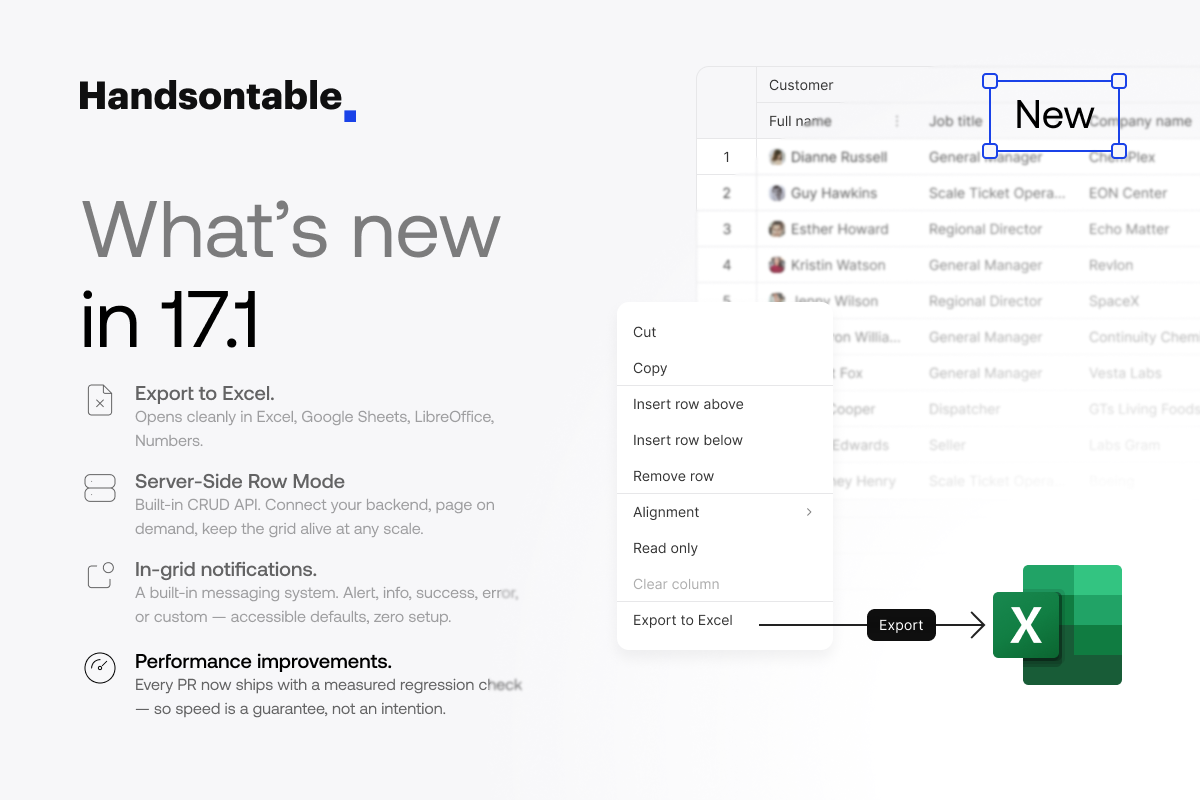
Handsontable 17.1.0 closes the loop on enterprise data workflows. This release focuses on what happens around the grid: getting data in from your backend, pushing it out to Excel, and giving users clear feedback along the way.
If you’re building admin panels backed by real APIs, the new Server-Side Row Model provides a built-in CRUD contract so the grid can fetch, page, sort, and mutate data directly against your server — no custom adapter code needed. The new Export to Excel feature lets end users save the rendered table as an .xlsx file with one call, preserving structure and formatting. And a new Notification (Toasts) system gives you a consistent way to surface info, success, warning and error messages for the async operations those features introduce.
Alongside these, we’ve migrated the documentation site to Astro Starlight, added an AI assistant to Theme Builder and the docs, published our first Accessibility Conformance Report (ACR)/ Voluntary Product Accessibility Template (VPAT), and landed significant performance gains on large datasets.
We’ve also added a wide range of new Recipes to the docs, providing detailed examples for column and data management, validation, data export, search and filtering, and other common operations.
This is a minor release and is fully backward-compatible with 17.0.x.
Export to Excel

The new Export to Excel feature lets you save the rendered table to an XLSX file — directly from the grid, without routing through a separate reporting service or relying on CSV workarounds.
The export respects what the user is actually looking at: column order, visible columns, applied filters, sort order, frozen rows/columns, and merged cells all carry over into the generated file. Cell types map to their Excel equivalents where possible (numeric, date, checkbox), so the file opens cleanly in Excel, Google Sheets, and Numbers without manual cleanup.
Export is triggered through the plugin API and can be wired to any UI control — a toolbar button, a context menu item, or a keyboard shortcut. For large datasets, the operation runs asynchronously so the UI stays responsive, which pairs naturally with the new Notifications plugin to confirm completion.
This closes a gap that’s shown up repeatedly in customer workflows: users who live in the grid but need to hand off a spreadsheet to stakeholders who don’t.
Server-Side Row Model

Server-Side Row Model is a built-in integration layer for backend-driven tables. Instead of loading the full dataset into the browser, the grid requests only the rows it needs and delegates sorting, filtering, and pagination to your server.
This dataProvider plugin defines a clear CRUD contract that your backend implements:
- Create — persist newly inserted rows
- Read — fetch a page of rows with the current sort, filter, and range state
- Update — persist edited cells
- Delete — persist removed rows
Each operation receives a structured request describing the grid’s current state and expects a structured response, so you can plug the contract into REST, GraphQL, or any transport of your choice. State management, optimistic updates, and reconciliation after failed requests are all handled by the plugin.
The result is that datasets of hundreds of thousands of rows become viable without custom virtualization or hand-written adapter code — and the integration pattern is consistent across projects, which matters when the same team ships multiple data-heavy apps.
Notifications (Toasts)

The new Notification plugin adds a built-in toast system for communicating status to users. It supports four types out of the box — info, success, warning, and error— along with configurable positioning, duration, and dismiss behavior.
Toasts pair naturally with the rest of this release: confirm a successful Excel export, surface a server validation error from the Server-Side Row Model, or flag a failed paste. Rather than each integration inventing its own notification UI, the grid now provides one that’s styled consistently with the active theme and accessible by default.
const notification = hot.getPlugin('notification');

notification.showMessage({

  variant: 'success',

  message: 'Exported 12,384 rows to sales-q1.xlsx',

});
Notifications can also be triggered from custom cell types, hooks, and plugins, making them useful well beyond this release’s features.
Theme Builder: AI Assistant
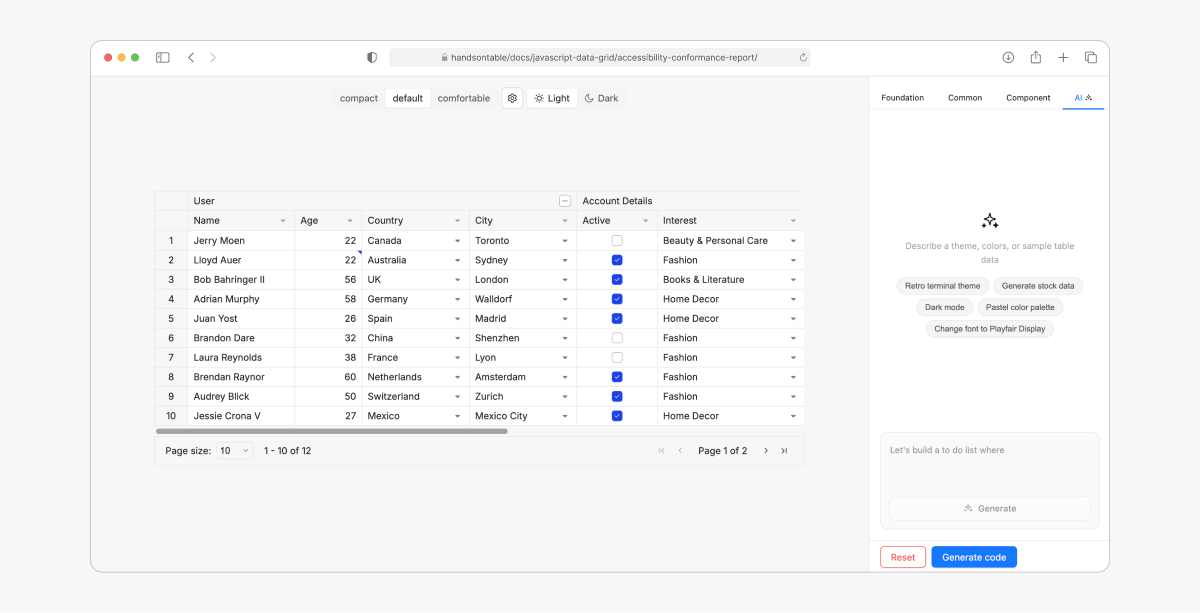
Theme Builder now includes an AI chat assistant that can generate themes and sample data from natural-language prompts. Ask it for “a dark theme matching the Stripe dashboard” or “a high-contrast theme for financial reporting” and it produces a Themes API token set you can preview, tweak, and export.
This builds on the Themes API foundation introduced in 17.0 — the assistant writes token mappings, not CSS overrides, so generated themes stay compatible with density modes, light/dark switching, and the rest of the theming system.
Docs Platform Updates
Migration to Astro Starlight
We migrated handsontable.com/docs from VuePress 1 to Astro Starlight.
The user-facing benefits:
- Faster page loads and smaller JS payloads (island architecture, zero-JS by default)
- Improved AI/LLM readability — code blocks and content are server-rendered as static HTML, which makes the docs easier to index and cite by tools like Claude, ChatGPT, and Perplexity
For our team, build times dropped significantly, which shortens the feedback loop for documentation contributions. Handsontable is a proud sponsor of Astro Starlight, one of many open source products we support.
Docs AI Assistant
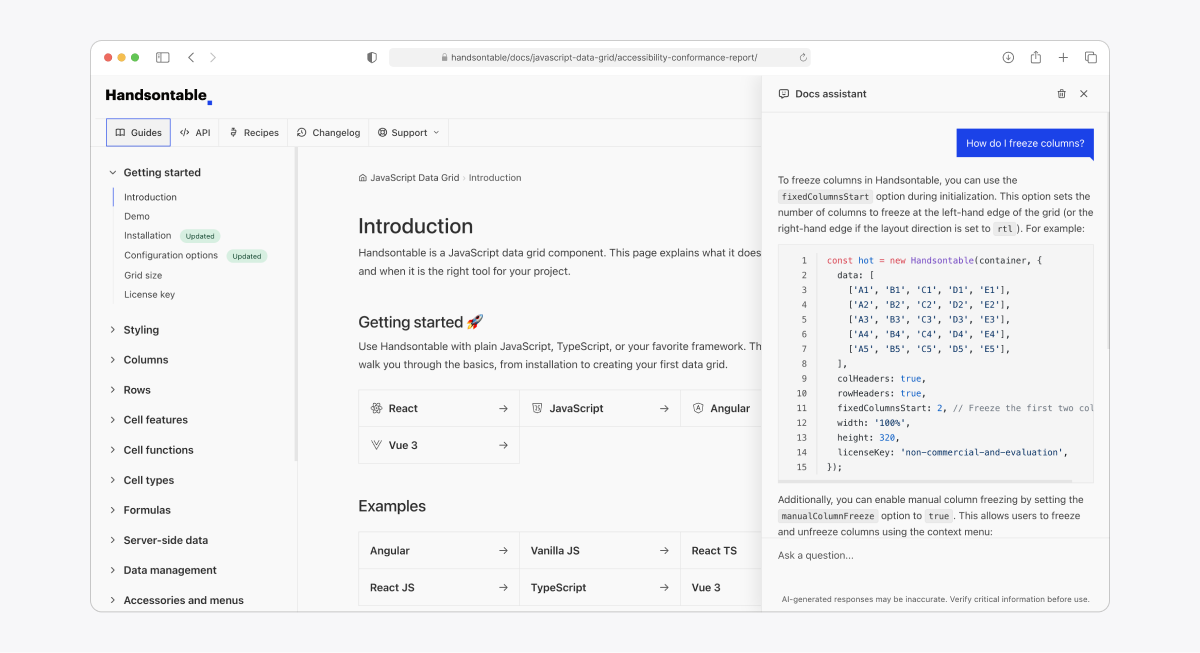
The docs now include an AI Assistant that can answer questions, generate code samples, and help you find the right docs pages on any topic. Just click the Ask AI button to begin chatting.
New Recipes
We’ve added over 40 new recipes with detailed examples on Accessibility & UX, Real-time & Integrations, Column and Data Management, Cell Types, Context Menu, Import/Export, Editing and Validation, Filtering and Search, Rendering and Styling, Performance, and Themes.
Each recipe bridges multiple concepts into a use case, showing exactly how different APIs can be combined to create advanced features and user interactions.
Accessibility Conformance Report (VPAT)
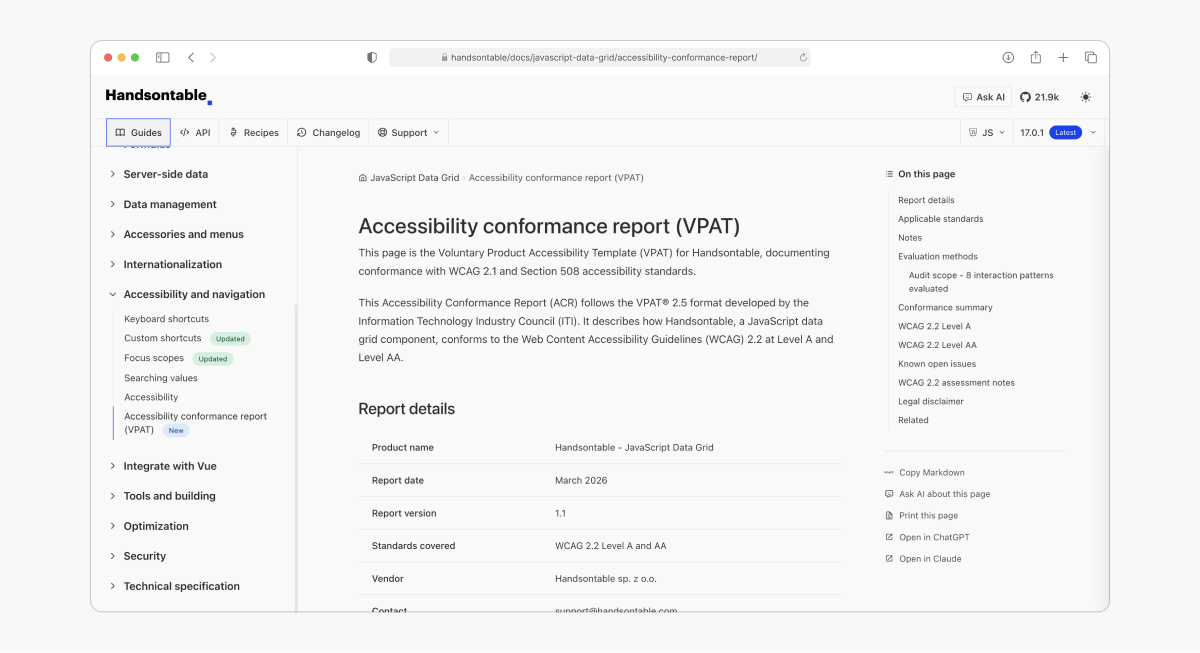
We’ve published an Accessibility Conformance Report based on the VPAT 2.5 template, documenting Handsontable’s conformance with WCAG 2.1 AA, Section 508, and EN 301 549. This is aimed at procurement, government, and enterprise customers who need formal accessibility documentation as part of their vendor evaluation.
Performance
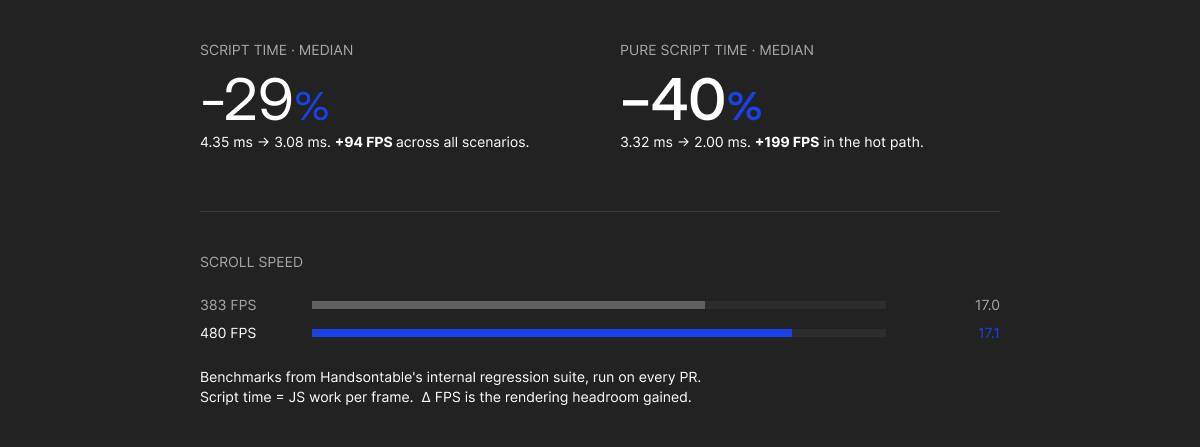
Performance is one of our top priorities, and 17.1 ships meaningful improvements for large datasets. We now measure performance on every PR, so regressions are caught before merge.
Release Notes
Added
- Added XLSX export support to the ExportFile plugin. #12166
- Added the DataProvider plugin and dataProvider table option for server-side row loading, paging, sorting, filtering, and mutations. #12147
- Added the Notification plugin for non-blocking toast notifications (info, success, error, warning, custom). #12299
- Added rowspan support to the NestedHeaders plugin, so column headers can span multiple header rows. #191
- Added a hit area for dropdown menu and collapsible buttons. #12070
- Added long-press gesture detection on touch devices to open the context menu. #12306
- Added dedicated paginationButton* theme tokens for default, hover, focus, and disabled states. #12317, #12404
- Added build weight comparison tables to the Modules guide. #12262
Changed
- Improved overall rendering performance. #12189
- Improved rendering performance during fast scrollbar movements. #12235
- Renamed the columnHeaders option to colHeaders in the ExportFile plugin for naming consistency with the rest of the API. #12224
- Added a frame-based E2E test wait helper and replaced selected hook test sleeps for more reliable test runs. #12161
Fixed
Editing & data
- Fixed setDataAtRowProp() canceling an active editor when the programmatic update targeted a different cell in the same row. #4305
- Fixed setDataAtRowProp ignoring the source parameter in array-form calls, so beforeChange/afterChange always received ‘edit’. #12300
- Fixed setSourceDataAtCell() updating a parent row instead of the intended child row when nestedRows was enabled. #10657
- Fixed the Nested Rows plugin being disabled after updateSettings with an empty data array. #10556
- Fixed a stack overflow when pasting 50,000+ rows. #11784
- Fixed incorrect parsing of comma-grouped values in numeric cells. #12114
- Fixed minSpareRows/minSpareCols adding rows/columns indefinitely when dataSchema defined non-null defaults (e.g. false for checkbox columns). #2409, #12254
- Fixed undo restore for mixed checkbox multi-selection delete. #12153
- Fixed autocomplete editor (strict mode + allowInvalid) discarding the typed value on click-away. #12285
- Fixed the Filters plugin applying conditions to the wrong columns after ManualColumnMove. #11832
- Fixed filter-by-value performance with searchMode: ‘apply’. #12104
- Fixed filter-by-value search to trim leading/trailing spaces and treat whitespace-only input as empty. #12290
- Fixed getCellMetaAtRow() to always return cell metadata in physical column order. #12109
Rendering, layout & themes
- Fixed stretchH: ‘last’ shrinking the last column to 0px when the viewport was too narrow. #11761
- Fixed column resizing being misaligned when the container had a CSS transform: scale() applied. #11838
- Fixed columnHeaderHeight overriding the actual header content height, causing overlay misalignment when text wraps. #12198
- Fixed selected fixed-column header alignment with data cells when using fixedColumnsStart. #12202
- Fixed six rowspan-related regressions in nested column headers. #12152
- Fixed nested headers crash when sorting with disabled current highlight. #12211
- Fixed comment editor positioning for merged cells. #12115
- Fixed Ctrl+A selecting the whole grid instead of the comment text when the comment textarea was focused. #12193
- Fixed column-menu dropdown button styling on filtered + active column headers. #12253
- Fixed a one-pixel misalignment of the left pagination caret. #2791
- Fixed multiselect overflow indicator not responding to chip padding token changes. #12316
- Fixed headerRowBackgroundColor having no visual effect on row headers — rowHeaderOddBackgroundColor/rowHeaderEvenBackgroundColor now derive from it by default. #12322
- Fixed a ThemeBuilder false “unknown token” warning on initialization. #12146
- Fixed portal-based popups (e.g. date picker) closing immediately on Android due to outside-click detection ignoring rootPortalElement. #12298
Hooks, formulas & types
- Fixed afterScroll* hooks firing when the axis position was unchanged. #12151
- Fixed disableVisualSelection: undefined being treated as true instead of falling back to the default. #12307
- Fixed an exception when showing the loading indicator from afterChange during editor close. #12348
- Fixed currentRowClassName and currentColClassName not updating dynamically via updateSettings. #12247
- Fixed wrappers crashing when init-only settings (renderAllRows, renderAllColumns, layoutDirection, ariaTags) changed after init. #12242
- Fixed autofill across hidden columns when Formulas is enabled and hiddenColumns.copyPasteEnabled is false. #12203
- Fixed HyperFormula errors when MultiSelect cells store array values. #12135
- Fixed multiple Handsontable instances sharing a HyperFormula engine becoming unresponsive due to cross-table update interference. #12305
- Fixed the modifyAutofillRange hook’s TypeScript signature and JSDoc. #11862, #12113
- Fixed incorrect return types in some hooks. #12309
- Fixed the dateFormat TypeScript type to accept Intl.DateTimeFormatOptions for the intl-date cell type. #12395
- React: fixed the wrapper skipping settings updates when dataSchema or columns contained non-plain objects (Date, Set, Map). #12207
Security
- Patched critical and high dependency vulnerabilities across the monorepo and aligned Angular wrapper tooling. #12237
Joseph Petty
Nuclear Plant Operator ☢️ (US Navy) turned Freelancer, turned Developer Advocate - Head of DX @ Handsontable, Founder/ Freelancer @ GreenFlux, LLC