
Handsontable 18.0.0 rebuilt the foundation: a TypeScript core, a rewritten rendering engine, and a new layout system. Handsontable 18.1.0 is where that investment pays off. Loading a 100,000-row grid now takes about a tenth of the memory it did in 18.0. The grid now supports Shadow DOM including Salesforce Lightning Web Components, and a set of editing and selection features that used to need custom code now ship built in.
This release also lands alongside two things worth their own announcements: a new demo playground that turns every example in our documentation into a live, editable grid, and a deep dive into the performance work.
Faster and lighter on large datasets
The largest share of this release (more than twenty changes) went into how the grid behaves at scale as your dataset grows. The clearest way to show it is the same grid on both versions: 100,000 rows by 100 columns, sorting and filtering enabled, default settings otherwise.
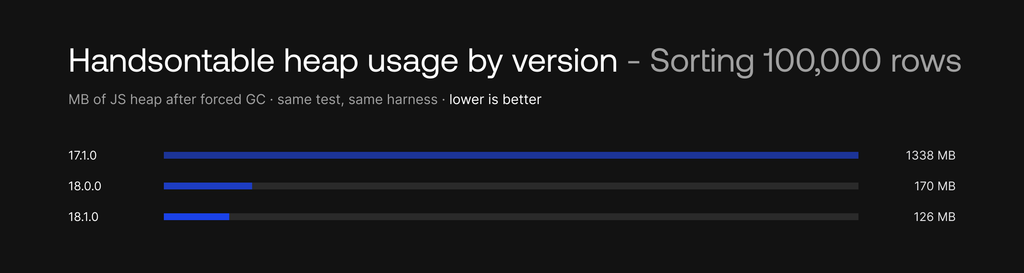
Measured Against 17.1.0, using our open-source test suite (repo):
- A million rows. Grids of 500,000 and 1,000,000 rows, which previously failed with out-of-memory errors, now render and scroll at a steady ~30 FPS — the same frame rate the grid holds at 10,000 rows. At one million rows, Handsontable’s heap footprint is now the lowest of any grid in our benchmarks.
- Up to 10× less memory. Sorting 100,000 rows drops from 1,338 MB of JS heap to 126 MB (10.6× less) with similar reductions across the filtering and scrolling tests. Handsontable now has the smallest memory footprint in 12 of the 13 tests in the suite.
- Faster operations. Sorting 100,000 rows is 2.1× faster, filtering 100,000 rows 2.5× faster, cell updates about 3× faster, and horizontal scrolling 4× faster.
Behind those numbers, cell metadata storage was rewritten around a native Map, and bulk operations — sorting, copying, pasting, filling, exporting, validation — no longer permanently cache settings for every cell they visit. A new getCellMetaTransient() method reads the effective cell configuration without caching it at all. Scrolling reuses more and rebuilds less: rows that stay in the viewport are kept in place while only the rows entering it render, and the automatic viewport offset extends in the scroll direction so consecutive steps reuse already-rendered cells.
Inside Shadow DOM and Salesforce Lightning
The Shadow DOM is a browser standard that gives a component an encapsulated DOM subtree of its own: page CSS cannot reach in, component CSS cannot leak out.
That encapsulation is what lets a design system ship a single implementation and run it in React, Angular, and Vue alike, which is why so many now ship as web components: Google’s Material Web, Microsoft’s Fluent UI Web Components and FAST, Adobe’s Spectrum Web Components, IBM’s Carbon Web Components, SAP’s UI5 Web Components, and Salesforce Lightning. If your UI builds on one of these, or on Lit, Stencil, or plain custom elements, your components already render in shadow roots.
Handsontable now runs inside one without anything arranged around it. The core library resolves mouse, focus, and clipboard events across the shadow boundary, and the grid creates its own stacking context in shadow-root embeddings, so frozen headers stay behind the host page’s navigation. Cell editing, selection, keyboard navigation, and copy and paste behave as they do in the regular DOM.
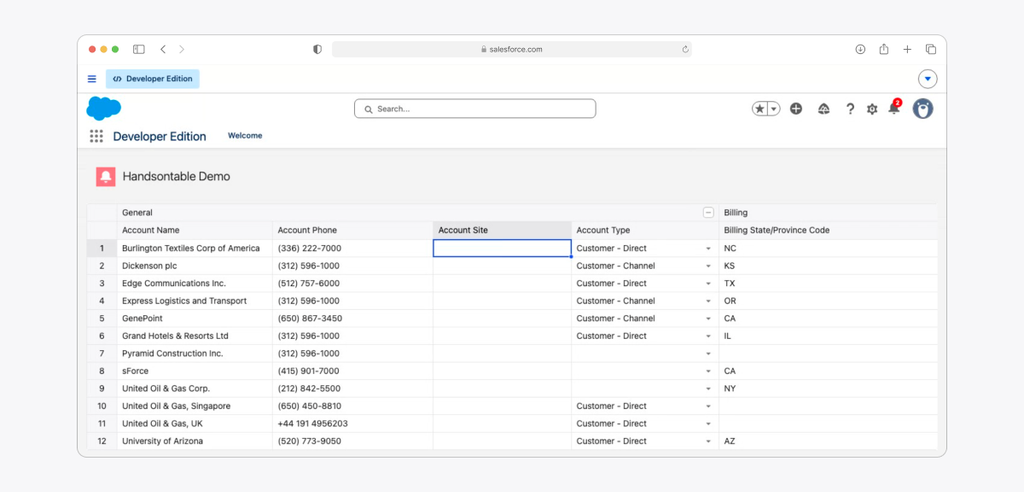
Two rules apply: load the base stylesheet and a theme inside the shadow root, and wait for them before creating the grid. Everything after that is a standard setup:
this._hot = new Handsontable(container, settings);
We used Salesforce Lightning Web Components as the reference target, because Lightning Web Security adds a sandbox on top of the native Shadow DOM and asks more of a library than a plain shadow root does. Lit, Stencil, and vanilla custom elements ask less, so the same behavior holds there.
If you already run the grid in a shadow root, the event and clipboard handlers in your wrapper can go.
Move and resize selections by dragging
Two new options bring spreadsheet-style selection gestures to the grid. With moveCells enabled, you can pick up a selected range by its border and drag it to a new location — the data moves with it. With selectionHandles, every selection shows a draggable handle at the midpoint of each edge, so you can grow or shrink the range by dragging instead of re-selecting it.
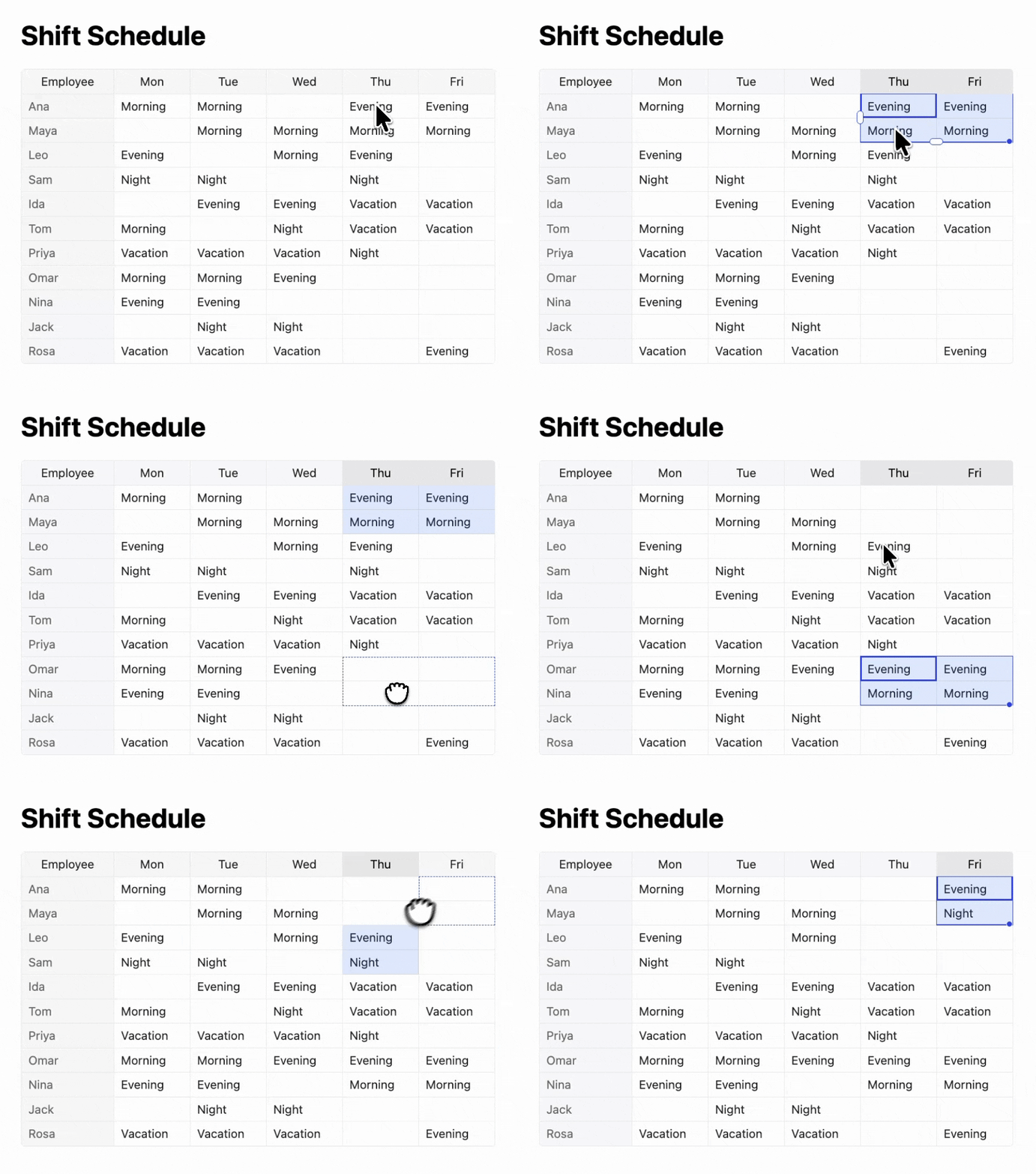
Try the live demo here
New configuration options
This release adds a few new ways to configure the grid:
singlePassLayoutrenders the grid in a single pass by predicting whether scrollbars will appear before rendering, instead of rendering and then correcting.preserveNumericLiteralon the numeric cell type keeps exactly what you type in the editor, preserving trailing decimal zeros and large-number precision.customBordersProgressiveapplies a largecustomBordersconfiguration in background batches, so the grid renders immediately and theafterCustomBordersUpdatehook fires once every border is in place.- Persian joins the built-in translations with full RTL support.
Every docs example is now a live demo
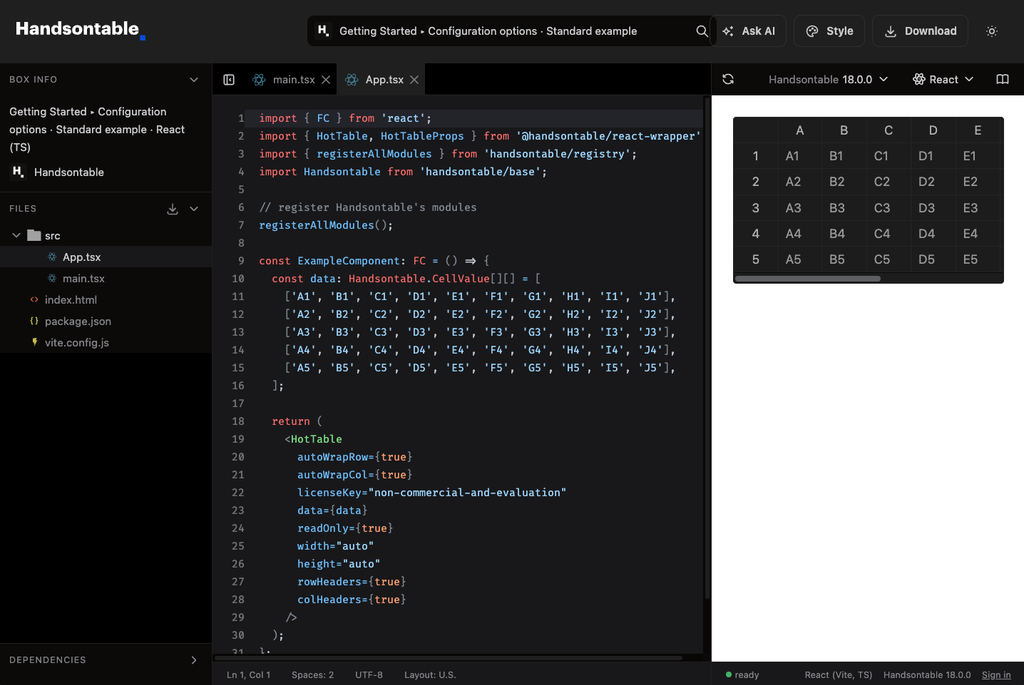
The “Open in StackBlitz” and “Edit in CodeSandbox” buttons in our documentation are gone, replaced by our own runner at demos.handsontable.com. Every example in every guide — 1,452 of them across five frameworks — opens as a live, editable demo, pinned to the exact Handsontable version the surrounding page documents. You can edit an example, share it with a permanent link, restyle it with the full theme token catalogue, or ask the built-in assistant to change it for you.
50+ improvements across the grid
Two fixes that React and TypeScript users have been asking for: <HotTable> and <HotColumn> props get autocomplete and type checking again, and hook callbacks typed through Events[hookName] or addHook now resolve to their real parameter types instead of any.
This release also brings more than 50 smaller improvements across the grid, including:
- Open menus — context menu, dropdown menu, and filters — now follow the grid when a scrollable parent or the viewport scrolls, and close when their anchor scrolls out of view.
- Merged cells stay whole through filtering, sorting, and collapsing rows, survive undo after overlapping column removals, and no longer slow down scrolling, large selections, or keyboard focus as the grid grows.
- Dragging a column header now moves the column even with sorting enabled; sorting happens on mouse-up, on the header label.
- -The new
intl-datetimecell type edits values with the browser’s native date-time picker and displays them in any locale throughIntl.DateTimeFormat(the new dateTimeFormat option), with column sorting, filtering, and Excel export supported out of the box. - Frozen rows and columns keep their selection borders, stay pinned after undoing an insertion, and no longer produce a spurious scrollbar in the last row or column.
- Numeric cells can keep exactly what you type: the new
preserveNumericLiteraloption preserves trailing decimal zeros and large-number precision. - Nested headers now follow their columns when you move them: labels travel with the column, and collapsed groups survive the move.
The release changelog has the complete list.
Upgrading to 18.1.0
The saveManualColumnWidths() and loadManualColumnWidths() family of methods now do nothing and will be removed in the next major release. Everything else in 18.1.0 is drop-in. The migration guide (18.0 → 18.1) covers the details.
npm install handsontable@18.1.0
Joseph Petty
Nuclear Plant Operator ☢️ (US Navy) turned Freelancer, turned Developer Advocate - Head of DX @ Handsontable, Founder/ Freelancer @ GreenFlux, LLC