
Solutions · Finance
Excel-grade grids for financial applications
Give trading, planning and banking teams a spreadsheet they can work in, inside the application you run. Range paste, autofill and 400+ Excel functions behave as they do in Excel, and every cell is checked at entry.
- Live data updates
- Excel-compatible formulas
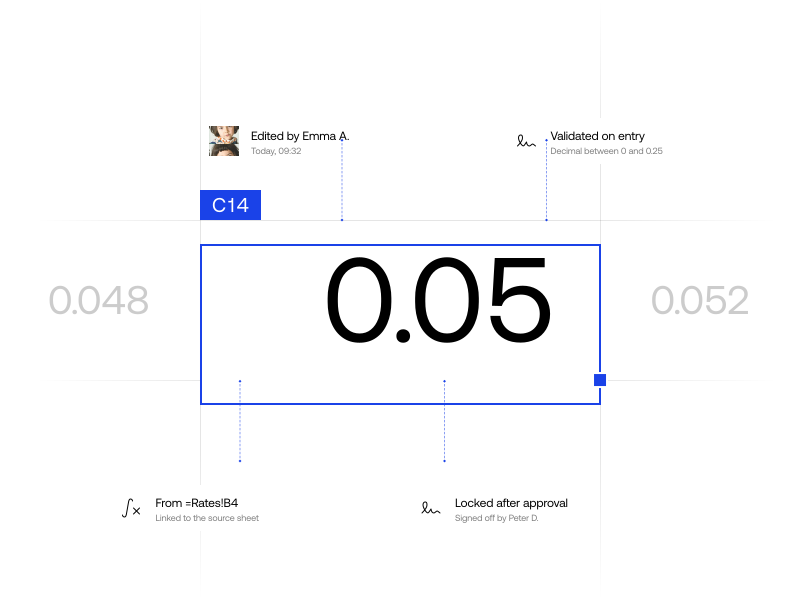
- Validation at entry
Finance teams building on it






Finance runs on Excel and on its risk
Models, blotters and schedules live in spreadsheets because nothing else is as quick to work in. The same file has no types, no validation and no access control, and regulators now count it as model risk.
Slow tools go unusedIf the new tool slows people down, they export from it and keep working in the file. Keyboard shortcuts and copy-paste with Excel work the way they do there.
Formulas must match ExcelHyperFormula evaluates 400+ functions in Excel syntax, PMT, NPV and XIRR among them, so a model gives the same answer in your app.
Errors stop at the cellCell types, validators and read-only ranges catch a wrong rate or date when it is typed, not in month-end reconciliation.
Month-end breaks on retyped figuresFigures retyped between files drift apart by month-end. Paste a range straight from Excel and it lands as one change that one undo reverses.
Overnight reports are a day lateA report built overnight is a day old by the meeting. The grid updates cells as data arrives, without losing the selection or the scroll.
Building a grid costs monthsAsterisk Networks had a prototype on the market in three months, and estimates Handsontable DataGrid saved it nine months of front-end work.
Explore financial use cases
Each one is a live grid, not a screenshot: click into a cell, change a figure and watch everything that depends on it follow.
Portfolio and position monitors
See exposure by issuer the moment a fill lands.
Monitor positions, fills and P&L by issuer as prices tick. Each company’s orders fold under it, and its totals follow every fill without moving the selection.
Core features:
Budgets, forecasts and P&L models
Re-plan the second half in minutes, not in a new copy of the file.
Plan the year with six months closed and six forecast from drivers. Change growth or hires and the year against budget follows; type an actual and the months after it re-base.
Core features:
Data classification with AI models
The model handles the routine. People make the calls.
Connect Handsontable DataGrid to your own AI model and every cell can arrive with a suggestion and the model’s confidence. Here the model codes journal lines to the chart of accounts: sure answers fill themselves in, marked as the model’s, and the rest wait for one keystroke or for an accountant’s call.
Core features:
Skip past the gridSkip back before the grid
Import October’s exports
One export per document type, from five group entities. For every line the model proposes a debit and a credit account from the group chart.
- supplier-invoices_2026-10.csvSupplier invoices · 105 lines
- customer-invoices_2026-10.csvCustomer invoices · 22 lines
- bank-statements_2026-10.csvBank statements · 36 lines
- payroll_2026-09.csvPayroll · 30 lines
- expense-claims_2026-10.csvExpense claims · 6 lines
- petty-cash_2026-10.csvPetty cash · 1 lines
Or drop any file here: the demo imports its own sample.
Invoices, quotes and billing
Bill from one price list, with totals that cannot drift from it.
Build invoices and quotes on a grid shaped like the document. Prices come from one price list, and HyperFormula works out every total in formulas you can read.
Core features:
In the words of
the teams who shipped it
“The business couldn't exist the way it does without Handsontable. It's the core of the communication between counterparties, and it provides a familiar tool that people already know, making it more attractive to potential clients.”
 Dave StewartLead Front-End Developer, Asterisk Networks
“We have a list of competitors and there are some showstoppers with each of them. We haven't faced a showstopper yet with Handsontable.”
 Simon GroetzingerSenior Developer, Open as App
“If we can have everything live and correct all the time, then we can serve clients better, which makes them happier and just makes us a better business.”
 Aaron FrancisCOO / CTO, Resolute PTS
How finance teams built on it
Case study 1 of 4, Finley: Raise debt capital like Finley
Built for financial-grade review
SecurityRegular independent security audits against OWASP Top 10 and OWASP ASVS, plus continuous code and dependency scanning with Snyk.WCAG 2.2Accessibility evaluated against WCAG 2.2 Level A and AA, including keyboard navigation, screen readers, color contrast, and ARIA.LTSEven-numbered releases get approximately 30 months of support, with critical fixes, security updates, and predictable upgrade cycles.ISOAudited against ISO/IEC 27001:2023-08.
Questions finance teams ask before they build
What a developer or an architect in banking, trading or FP&A asks first about Handsontable DataGrid.
See every questionYes. Write prices and fills to the grid as they arrive and only the cells that changed redraw; the selection and the scroll position stay where the user left them. Virtualization draws only the rows in view, so a book of thousands of rows scrolls at full speed.
For most models, yes. HyperFormula, the engine behind the grid’s Formulas plugin, evaluates 400+ functions in Excel syntax, PMT, IPMT, NPV and XIRR among them. Its documentation gives a configuration that matches Excel’s defaults and lists every known difference, so check a model’s functions against that list before you move it.
The grid reports every change through its hooks: which cell changed, from what, to what, and whether it was typed, pasted, filled or undone. Storing that trail, and the permissions around it, stays in your application, where your compliance rules already live.
Yes. Copy a range in Excel and paste it into the grid: the values land in their cells as one change, which one undo reverses, and the column’s validators check what was pasted.
Read-only cells, columns and ranges, and the validators on them, are set by your code, so they can follow each user’s role from your own authorization. The grid enforces what it is given; it does not decide who the user is.
React, Angular and Vue through official wrappers, and plain JavaScript or TypeScript without one. The same configuration works in each.
Ready to move a model out of the spreadsheet?
Start a 45-day evaluation with the full grid, HyperFormula and direct help from the people who build them.